Max Lyons Image Gallery
Latest News and Updates |  Subscribe (RSS feed) Subscribe (RSS feed)
|
|
High Resolution Digital Images. This site contains photographs by Max Lyons, all of which have been created by combining multiple individual photographs into larger composite images. These composite images are extremely high resolution, capable of producing much larger, sharper, more detailed prints than would be possible with conventional photographic equipment and methods. Image Catalog. A searchable catalog containing thousands of images. Don't know where to start? Looking for something specific? Want to find the latest updates? This is the place to start!
Image Galleries. A changing selection of images from the catalog.
E-books. These e-books contain selections of images from the gallery, and are free for personal use. The books are in PDF format and can be viewed with any PDF viewing software. Each book is available in two different formats, both of which contain identical images and content. The only difference is that one is formatted for devices with relatively square screens (such as the IPad), and the other is formatted for other devices (e.g. most computer monitors and almost all other tablets) which generally have wider screens, and, as such, are better suited to the panoramic format of my images.
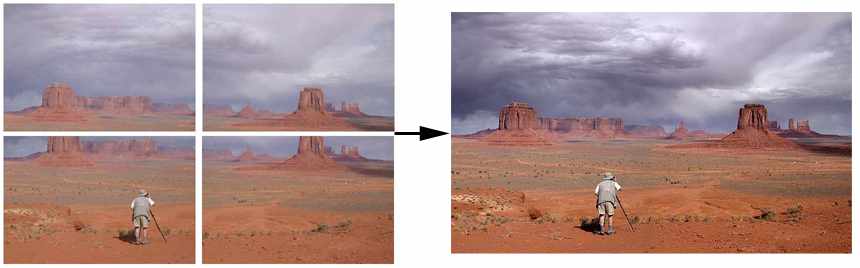
How and Why? I create my composite ("stitched") images using my own PTAssembler software, a program that I have written over the last 12 years and continue to update. PTAssembler is one of the most sophisticated panoramic image creation programs available, and I use it to produce composite images that are completely seamless, with no indication of where the images have been merged. (Here are "before" and "after" pictures illustrating the individual and final composite images.)
I create images this way for a few reasons. First, it allows me create images that capture extremely wide scenes -- much more than would be possible with a conventional camera lens. Second, and perhaps more importantly, is the ability to create big images that can be printed at much larger sizes that normal photographs, and still appear extremely sharp and detailed upon close inspection. Combining a few (i.e. 5 or 10) images from a modern 15 or 18 megapixel digital camera produces a picture with 75 to 180 million pixels -- capturing far more detail than any single image from one of today's consumer-level digital cameras, exceeding 35mm and medium format film cameras, and rivaling large format film cameras. Combining more images creates pictures with remarkable amounts of detail -- exceeding anything that can be accomplished with standard film or digital cameras. Because of this detail, these stitched images produce extremely sharp, detailed prints at sizes of up to 40x60 inches and well beyond. In contrast, prints of this size from single digital camera images typically lack detail and appear soft. (Click here for a more detailed discussion about image detail, with an example from a 725 megapixel stitched image.) Taking this idea to an extreme, I created in 2003 what was the first, stitched gigapixel image (over 1,000,000,000 pixels) which was exhibited in Las Vegas in 2004. I created a second gigapixel image shortly after the first, and continue to do so. My images have been featured in a number of different venues, including a demo by Steve Jobs at the Annual Apple Developer conference in 2007.
In the early 2000s, creating gigapixel images was extremely difficult because of limitations in software, computer power and photographic hardware. With the advent of improved commercial software and robotic equipment, a number of record-seekers continue to create ever-larger images, with ever less interesting subject matter. My focus is on creating large images that interest the viewer because of their subject matter, not because of their size. Prints, Downloads and Contact Information. The full sized versions of these images can be hundreds or thousands of megabytes, are far too big to be viewed easily in a web-browser. Thus, this site contains resized versions of the images, in order to make them more manageable for viewing online. I am making printed and digital versions of my images available here, and images can be ordered online via the "purchase" link displayed on each image page. (More info here). Please contact me with any questions of for more information, or join the conversation in my discussion forums. More Reading
Blended Exposures. This small gallery of "blended" images contains images of very high contrast scenes which typically cause problems for digital (and film) cameras. Because cameras cannot capture as wide a range of light and dark subjects as the human eye, these scenes would normally be recorded with bright areas as completely white, and/or shadowed areas as completely black. By taking two images (one that captures the bright areas correctly, and one that captures the dark areas) and then blending them using software, a composite image can be created that portrays the scene as a human eye would perceive it. Stacked Images. This gallery contains images that are produced by layering (or "stacking") multiple exposures of the same scene on top of each other. There are several results that can be achieved using this technique, but my primary objective is to create "synthesized long exposures"--lasting several minutes or longer. Some digital cameras are incapable of taking exposures longer than 30 seconds, which normally makes star-trail photography, moonlight landscapes and other interesting images impossible. All of the images in this gallery were created using Image Stacker and/or Star Tracer. Thanks for visiting. Send any comments to Max Lyons.
|